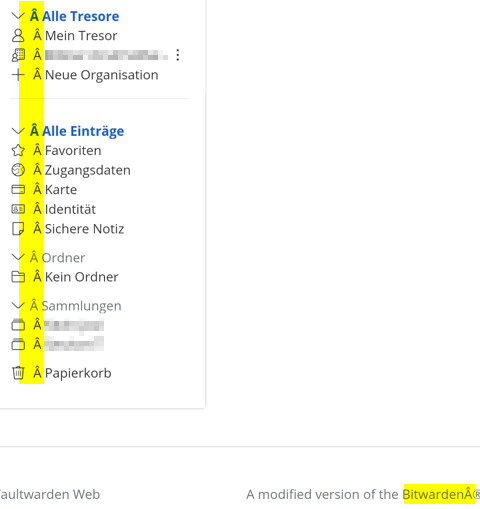
Hello,
I’ve installed the normal reverse proxy and we have a extra WAF rule from Sophos.
But when I open the website in public we get a wrong html display, internal is all fine.
Any ideas?
Our Installation with portainer in different Containers:
version: “3.7”
services:
mariadb:
image: “mariadb”
container_name: “mariadb”
hostname: “mariadb”
restart: always
volumes:
- “mariadb_vol:/var/lib/mysql”
- “/etc/localtime:/etc/localtime:ro”
environment: - “MYSQL_ROOT_PASSWORD=X”
- “MYSQL_PASSWORD=X”
- “MYSQL_DATABASE=vaultwarden”
- “MYSQL_USER=X”
vaultwarden:
image: “vaultwarden/server:latest”
container_name: “vaultwarden”
hostname: “vaultwarden”
restart: always
volumes:
- “vaultwarden_vol:/data/”
environment:
Had issues when using single parentheses around the mysql URL as in the plain docker example
- “DATABASE_URL=mysql://X:X@mariadb/vaultwarden”
- “ADMIN_TOKEN=X”
- “RUST_BACKTRACE=1”
- “WEBSOCKET_ENABLED=true”
- “SIGNUPS_ALLOWED=true”
- “INVITATIONS_ALLOWED=true”
- “SHOW_PASSWORD_HINT=false”
- “USE_SYSLOG=true”
- “LOG_LEVEL=info”
- “EXTENDED_LOGGING=true”
ports: - “8060:80”
- “3012:3012”
logging:
driver: syslog
options:
syslog-address: “udp://IP”
tag: “Vaultwarden”
volumes:
vaultwarden_vol:
mariadb_vol: