Hello, i want to add an Token2 Hardwarekey to my Vaultwarden, but everytime i want to read the key i get the same error. First it says to click the button from the key and then without doing anything i get the error. Key is working well with nextcloud and webauthn.io

Hello.
- Does the key have a PIN set?
- Can you try with the web Bitwarden > Token2 | Using Bitwarden Passkey functionality with Token2 FIDO2 Security Keys | Token2 Store | programmable hardware token, FIDO2 key, U2F key, TOTP,
Also note that some older OS versions may not support the PRF feature
I opened the console in the browser while i try to read the key and get this error below in the picture. I never tried with bitwarden because i don’t have an account there, only vaultwarden. I tried once in nextcloud for the login without password and it works well. After reading the key the windows security popup come and i set the pin. In vaultwarden no popup window was there

what domain do you use? It should be an FQDN ([sub].domain.tld) and a valid TLS cert.
Otherwise WebAuthN will fail
My domain is written like xxxxxx-xxxxxx.duckdns.org.. i have an ssl certificate from letsencrypt with the nginx proxy manager.
And you have the RP matching it in the configuration?
What do you mean with RP?
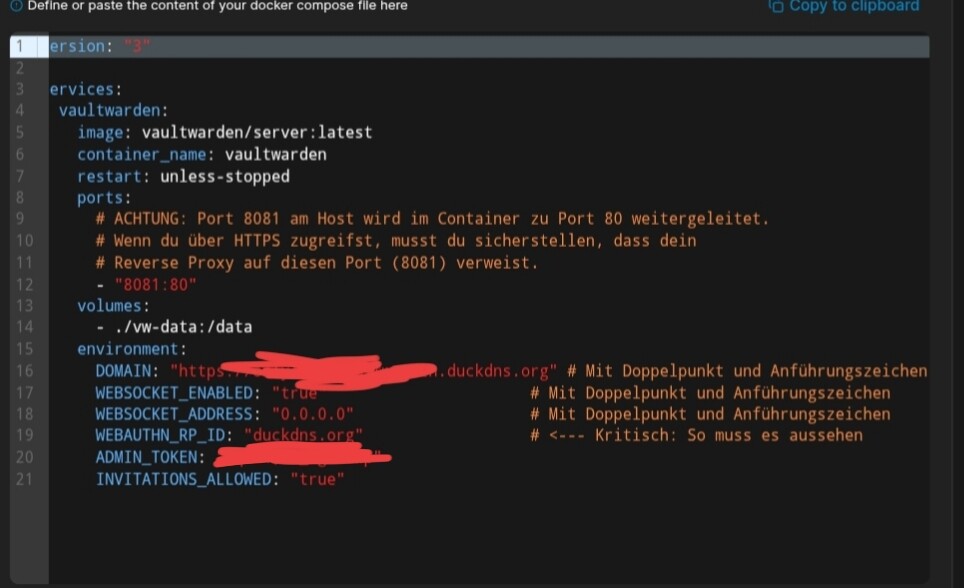
Ah i know what you mean, i tried rp with the full domain and with the one in the picture below. It doesnt matter
It does matter; your web interface opens as xxx-xxx.duckdns.org, but the WebAuthN RP is set to duckdns.org. this will not work, it should be the same as domain
Also, the port matters, normally you should be accessing your web using h ttps://xxx-xxx.duckdns.org/
do you have :8081 added to the URL?
no vaultwarden is on port 8081 from the ip on my server at home.
Then you can try to specify that in the RP field, oe
I think i found the mistake. In my case Nginx pm forwardhostname is an ip with the forward port 8081. I think vaultwarden wants an domain here too, but i dont know i should do that in my network
You can test internally first using hosts file